
MuPiBox Manual
The MuPiBox is a music and audiobook player for children, which they operate themselves on a touch screen. This manual belongs to the box and is store…
The MuPiBox is a music and audiobook player for children, which they operate themselves on a touch screen. This manual belongs to the box and is stored on it: you can always reach it at http://<address of the box>/manual/, even without internet.
Classic and NG: which MuPiBox is this?
Classic deliberately keeps things simple so young children can choose stories and music independently. Its clear controls may also suit older users and people with impaired vision. Classic is not restricted to toddlers.
NG (Next Generation) is designed to grow with its users. It supports diverse media sources, customisable layouts and apps controlled through parental settings. There are more features to explore, but the interface remains child-friendly.
Identification: Classic has a white MuPiBox wordmark and a small white mascot on a dark background. NG uses a colourful wordmark and is clearly labelled NG or MuPiBox NG in the admin interface. RFID is currently available in NG but could be supported by Classic in the future.
Both editions have their own strengths. Compare their features and audiences.
Where do I start?
| You want to … | Then read … |
|---|---|
| switch the box on for the first time | Getting started |
| know how the child uses the box | Using the display |
| get audiobooks, music, Spotify, podcasts or radio onto the box | Adding content |
| limit listening time or set a bedtime | Playtime and quiet times |
| connect accessories: rotary knob, battery, fan, Bluetooth | Hardware and accessories |
| set up Wi-Fi, password, Telegram or Home Assistant | Network and remote access |
| update the box, back it up or restart it | Maintenance |
| find out what to do when something does not work | Troubleshooting |
Two interfaces
The box has two interfaces that work together:
- The display on the box. This is where the child listens: tap an audiobook or a song, done. Chapter: Using the display.
- The app in the browser of a phone or PC. This is where parents set everything up: content, times, volume, Wi-Fi, updates. Chapter: Opening the app and signing in.
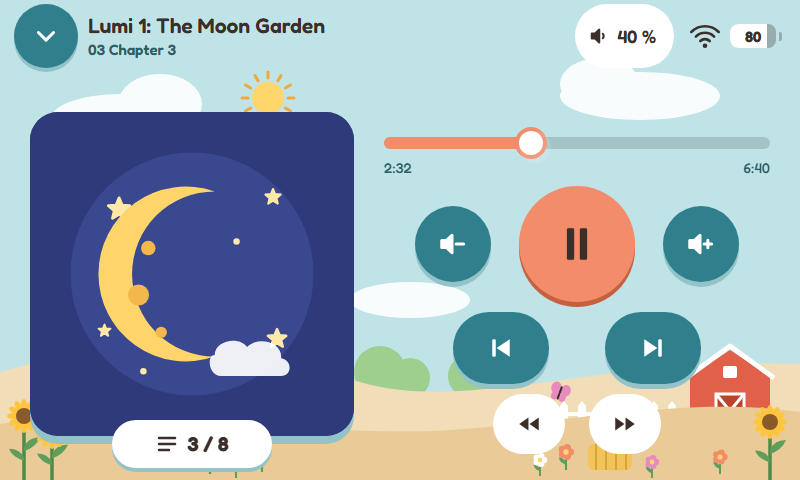
An audiobook in the player on the display
How this manual is written
- I write menu paths like this: Settings › Audio › Volume. That is the way through the app.
- Boxes marked Warning warn about things that can break something or delete data.
For help beyond this manual there is the website mupibox.de and the community's Discord channel.